

In this article, I am going to introduce the basic principles we need in order to create useful reporting of your buyer's journey and customer journey in your CRM. A lot of companies talk about these interchangeably, but properly differentiating between these core concepts is an important step towards gaining the insights your company needs.
The difference between the Buyer's journey and the Customer journey
The buyer- and customer journey are different phases of the same process, and the split will sometimes even depend slightly on the specifics of your business. For software companies or similar service business models you may also encounter talks about the user journey, which often overlaps with one or both of these.

The buyer's journey happens first, and represents the basic stages a potential buyer will typically go through on their way to becoming a customer. It starts with any person or company from the first time they hear about you, and follows the key conversions until they become a customer. As the name suggests, this is where the customer journey begins and the buyer's journey is thereby completed.
Why lifecycle stages should not replace status fields
Lifecycle stages for tracking the funnel
Most companies focus on tracking the journey as a funnel up until a buyer becomes a customer. This is partly because the steps and conversions are much more linear, while customer interactions have a lot more variables and can differ over time. The default lifecycle stages in HubSpot also end at Customer / Evangelist for this same reason, and many companies even remove the evangelist stage.
You can absolutely track customer journey stages effectively by the funnel as well, but it should not replace updated information about status and sentiment!
Lifecycle stages are a great way to track "the funnel", providing important insights into how well your team are converting potential customers through the general steps towards becoming a customer. This will focus on conversion rates in a linear process, and show clearly where your buyers are falling off.
By this nature, lifecycle stages can only ever progress forward. A lead should never go back to just a contact, and a customer should never go back to being a lead. That way, you also won't have the same person be a "new" lead three quarters in a row, because it would give the wrong impression about your ability to generate leads.
Status properties for updated status
Status properties like "lead status" or "customer status" are much more flexible, and should be used to keep track of the updated status of a lead or customer. This is where you keep track of if a lead is "disqualified", or "connected", etc. or if a customer is active, or might have churned.
The critical difference here is that status fields are not linear because business relationships does not work that way. A hot lead could go cold, and become hot again later, just like a churned customer could come back.
Best practice: How to report on the buyer's journey
Tracking the funnel with lifecycle stages
Defining the stages
When setting up your lifecycle stages to track conversions through the buyer's journey in HubSpot, the default setup is a very good place to start. The default stages are:
- Subscriber
- Lead
- Marketing Qualified Lead
- Sales Qualified Lead
- Opportunity
- Customer
- Evangelist
- Other
This covers the general stages most companies would need, but we would recommend to consider if any of the following adjustments makes sense for your organization.
Add or remove any essential or non-essential stages
It is tempting to include as many possible conversions as you can think of here, but this will quickly become an unstructured mess, and specific campaigns can be measured better in other ways. All the lifecycle stages should be generic to all contacts, represent a relevant progression towards a new customer, and always happen in a set order.
Contacts can skip over certain steps of the funnel, but they should never move backwards. I.e. from the default stages a contact can become a sales qualified lead directly (depending on your process) but they can never become a marketing qualified lead after that. The same logic means a customer can not become a lead, because they are already a customer.
If you don't have a process where leads are marketing-, then sales qualified, you would consider removing one of these stages. If you can see that 90 % of your contacts skips a certain step, it should probably either be removed, or tracked in a more reliable way.
Many software companies would potentially want to add a stage for user, or trial, or potentially even Free user and Paid user if this is the general path for your buyers to become customers.
Many HubSpot users also choose to either ignore or remove the evangelist stage because of how difficult it can be to set objective and reliable criteria for this metric. You may want to instead add a "long-time customer" to measure how many of your clients remain with you past a critical point, i.e. the first 12 months.
You also have a stage called Other which is often ignored, but plays an important role in data quality, and I will get back to this stage in the set-up section.
Use consistent and understandable naming
Different opinions about what defines the different stages is very often a source of conflict in larger commercial teams. Update to clear and understandable names and use the same definitions everywhere to avoid misunderstandings. In Hubex, we often recommend a modified version of naming the default stages:
- Contact
- Lead
- Engaged lead
- Qualified lead
- Opportunity
- Customer
- Other
These are the stages I will use as my example in the rest of the article, but they may look different for you.
Automating the tracking
We typically aim to automate every part of the lifecycle stage tracking. This is because automated tracking ensures consistent and reliable data, and most importantly, it forces you to set objective criteria for every single step. That way, our conversions are not influenced by gut feelings, or who followed up on the relevant leads.
The "Other" stage
The lifecycle stage "Other" plays an important role in your funnel reports because it is used to prevent irrelevant contacts from being reported as new leads or missed opportunities.
It is important that this is the last stage in your set-up because that will prevent contacts in the Other stage from triggering a new stage, as they can't move backwards in the progression.
Contacts and companies you interact with that are not relevant potential clients should be set to the "Other" stage so they won't influence your reports. This would typically be your own employees, partners, agencies, competitors, or anyone who would not be a relevant prospect for your offering.
Set up a workflow to make sure any contact with your own domain will be set to this stage. Partners can be moved manually to this stage, and make sure contacts of a partner company is also then automatically updated.
Contact
This is the first stage, and will be the default status of any contact record. You do not need to automate anything here, but you can update your settings to make sure new contacts and companies are set to this stage by default.
Lead
The lead stage should be used for any contact where you have an indication that they could be interested in your offering.
Set contacts to this stage based on activities like signing up to a newsletter or events, or downloading content suggesting they may be a good fit for your company. You can also use your ICP criteria to mark contacts as leads.
These are the contacts you want to include in your audience or marketing outreach with the goal to make them show further interest or buying intent.
Leads in this stage should NOT be considered hot leads, and typically not be assigned to a sales team yet, but many companies may still reach out to these prospects if there is a lack of new opportunities to work on.
Engaged Lead
An engaged lead is someone who has taken decisive action to get in touch with you, or shown a clear buying intent and is expecting to be contacted. These are the leads you assign to your sales team, and expect to follow up on.
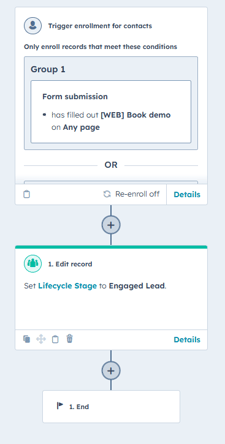
Typical triggers to set a lead as an engaged lead are contact forms to the sales team, or a sign up to either a demo or a trial version of your offer, or any similar activity where you should reach out to the buyer.
Qualified Lead
Defining a qualified lead depends a little bit more on your teams specific process and what expectation your leads have. In some cases you can say that a lead is qualified if the assigned sales representative reaches out to them. Otherwise they would be disqualified and just ignored.
In other cases if your engaged leads all expect to be contacted, you could rather define a qualified lead as someone the sales rep does not disqualify after the first conversation.
The conversion rate from engaged to qualified lead would inform your marketing team about the quality of the leads you get, and can be used to re-evaluate the "engaged lead" criteria, or maybe adjust the target audience or messaging.
Opportunity
The opportunity stage is by default set to be triggered when a contact is associated to a deal, and we recommend to keep it like that for most teams. The sales team would open a new deal record on a contact when there is an established interest, and the conversation shifts from discovering a business case to negotiating scope/license tiers and pricing terms.
Customer
The customer stage is also fairly straight forward, and set by default by HubSpot. When a contact is attached to a deal that is "closed won" they are updated to the customer stage, and stays there.
Remember that this is not a status field, so the contact stays in the customer stage even if this is a one-time purchase, or if they eventually churn.
Syncing lifecycle stages between contacts and companies
For most B2B companies, it can make good sense to sync lifecycle stages between contacts and companies, to make sure all your contacts are updated with the relevant status. If a company is already a customer, this would set all new contacts from that company to a customer as well, meaning you won't have to worry about reports saying you have a new lead every time you talk to a new person you already have a deal with.
The "sync lifecycle stages" setting in HubSpot will sync these for you from companies to contacts, so you may want to also use workflows to make sure an updated lifecycle stage on a contact also updates the primary company. Keep in mind that even workflows will not set a lifecycle stage back to an earlier stage than what is already registered, so a customer won't be set to a lead, even if it triggers a workflow for this.
Setting up relevant reports
There are a number of ways to report on this journey, and every consultant or admin has their own preferences, but here are some of the most common reports and practices.
Buyer's journey- or funnel reports primarily focus on conversion rates between the stages, but can differ in how they interact with time factors, and how they treat "skipping" stages in the process.
The funnel report
The funnel report is the most common way to report on lifecycle stages in HubSpot, and it is very easy to set up. You see the total number of new contacts that entered the first stage, and conversion rates through each stage in the journey.
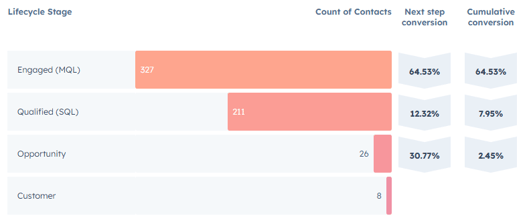
As you can see in this example when I remove a stage, the conversion to "customer" is higher. That is because this report will only count the contacts as they enter every step included in the report. In this example, there were some customers who skipped the opportunity stage, which is why the first image shows a smaller number of customers.

Keep in mind that these reports also restrict every stage in the report to the selected timespan in your filters. If you are looking at last year, you will only see how well the leads converted last year, even if some of the leads may have become customers later.
NB: These reports are not fully compatible with dashboard filters.
Bar chart - Where are they now?
This report puts a larger focus on the current or final status of leads created in a specific period, regardless of whether they skipped steps or when the conversion happened.
Because of this focus, these reports can change over time, as new interactions happen, even if the time period is over.
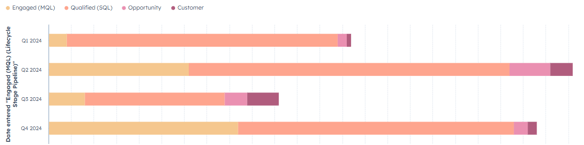
You should expect to see a significant difference from one quarter to the next in these reports, simply because leads from Q1 in this example may have converted further in the next three quarters, while the leads from Q4 are not there yet.
This makes these reports less ideal for comparing results from different periods, depending on the length of your sales process.